WooCommerce plugin
ChatGPT Ads conversion tracking for WooCommerce.Without building it yourself.
Product views, carts, checkouts and purchases are tracked in the browser. Purchases are also sent server-side, with deduplication, retries and order-level diagnostics built in.
From €79/year · Installs like any WordPress plugin
In the browser
Also from your store
Server-side delivery covers the purchase, through the OpenAI Conversions API.
Pixel for ChatGPT Ads
ConnectedEvents tracked
Last 7 days- Product viewed1,248
- Added to cart312
- Checkout started104
- PurchaseBrowser + server38
Purchase delivery
- Accepted#10482€128.40Browser and server
- Pending#10480€312.90Next attempt in 4 min
Plugin interface. Counts and orders shown are examples.
Made for WooCommerce, not adapted to it.
- WooCommerce native
- Reads your products, cart and orders directly.
- HPOS safe
- Runs on High-Performance Order Storage and legacy tables.
- One settings screen
- No theme edits, no tag manager, no data layer.
- Consent aware
- Follows the marketing consent recorded through the WordPress Consent API.
Track the full buying journey.
Four moments, from the first product page to the paid order. The purchase gets a second delivery path of its own.
In the browser
Product viewed
Someone opens a product page
contents_viewed
Added to cart
A product goes into the cart
items_added
Checkout started
A customer reaches checkout
checkout_started
Purchase
The order is paid
order_created
Also sent from your store
Through the OpenAI Conversions API, when the order is paid.
In the browser
Product viewed
Someone opens a product page
contents_viewed
Added to cart
A product goes into the cart
items_added
Checkout started
A customer reaches checkout
checkout_started
Purchase
The order is paid
order_created
Also sent from your store
Through the OpenAI Conversions API, when the order is paid.
What you are buying
More than a pixel snippet.
A snippet fires on a page. This tracks the store: what people looked at, what they bought, whether the purchase was accepted, and what to do when it was not.
Track
The whole journey, not just the sale.
Four WooCommerce moments are reported from the browser, using your real products, cart and order values.
- Product viewed
- Added to cart
- Checkout started
- Purchase
- Real product and order values
Confirm
The purchase is also sent from your store.
When WooCommerce marks the order paid, your server sends the purchase to the OpenAI Conversions API — a delivery path that does not depend on the customer's browser.
- Purchase through the Conversions API
- Sent once the order reaches a paid status
- Shared event ID across both paths
- The original purchase time is sent
Keep it working
The unglamorous part is already built.
Deduplication, retries, diagnostics and updates are the work you would otherwise be building and maintaining yourself.
- Browser and server deduplication
- Automatic retries for temporary failures
- Per-order delivery diagnostics
- Manual retry when an order is eligible
- Consent-aware, fail-closed loading
- Plugin updates while the licence is active
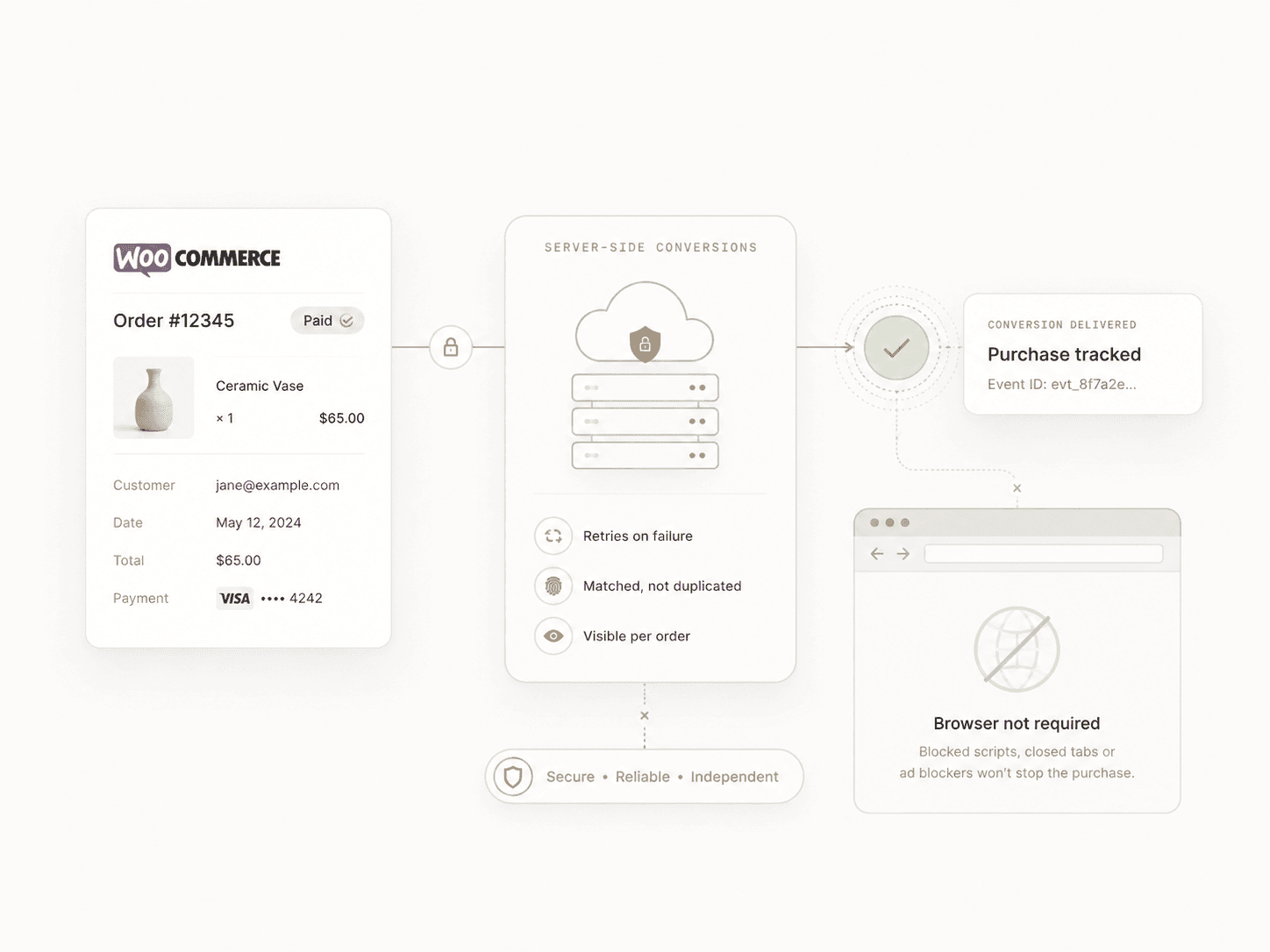
The purchase does not depend on the browser.
Browser tracking follows the journey. When WooCommerce marks the order paid, the purchase is also sent from your store through the OpenAI Conversions API.
- A second path for the sale
- Blocked scripts, closed tabs and failed page loads stop browser events. The order still exists in WooCommerce, so the purchase can still be sent.
- Matched, not duplicated
- Both deliveries carry the same event ID, taken from the order. Resolving them into one conversion happens on OpenAI's side.
- Temporary failures retried
- Timeouts, rate limits and server errors are retried automatically rather than dropped.
- Visible per order
- Each paid order carries its own delivery state, attempt count and response status.
Server-side delivery covers the purchase only. Product views, add to cart and checkout start are browser events. How server-side purchase tracking works
You can build this yourself. Then you have to maintain it.
Every line below is real work on a real WooCommerce store. The only question is whose job it is.
WooCommerce browser events
- This plugin
- Included
- Yourself
- You build them
Server-side purchase conversion
- This plugin
- Included
- Yourself
- Build the API integration
Browser and server deduplication
- This plugin
- Included
- Yourself
- Design and maintain event IDs
Temporary API failures
- This plugin
- Retried automatically
- Yourself
- Build a retry queue
Order delivery diagnostics
- This plugin
- Built in
- Yourself
- Build the admin tooling
Consent-aware loading
- This plugin
- Built in
- Yourself
- Implement it yourself
Retrying a failed order
- This plugin
- Built in, where eligible
- Yourself
- Build recovery tooling
Updates in WordPress
- This plugin
- Native plugin updates
- Yourself
- Maintain your own code
API changes over time
- This plugin
- Covered by plugin updates
- Yourself
- Your responsibility
Getting started
- This plugin
- Install and configure
- Yourself
- An engineering project
Install the integration instead of becoming its maintainer.
Get Pixel for ChatGPT AdsKnow whether the purchase was actually sent.
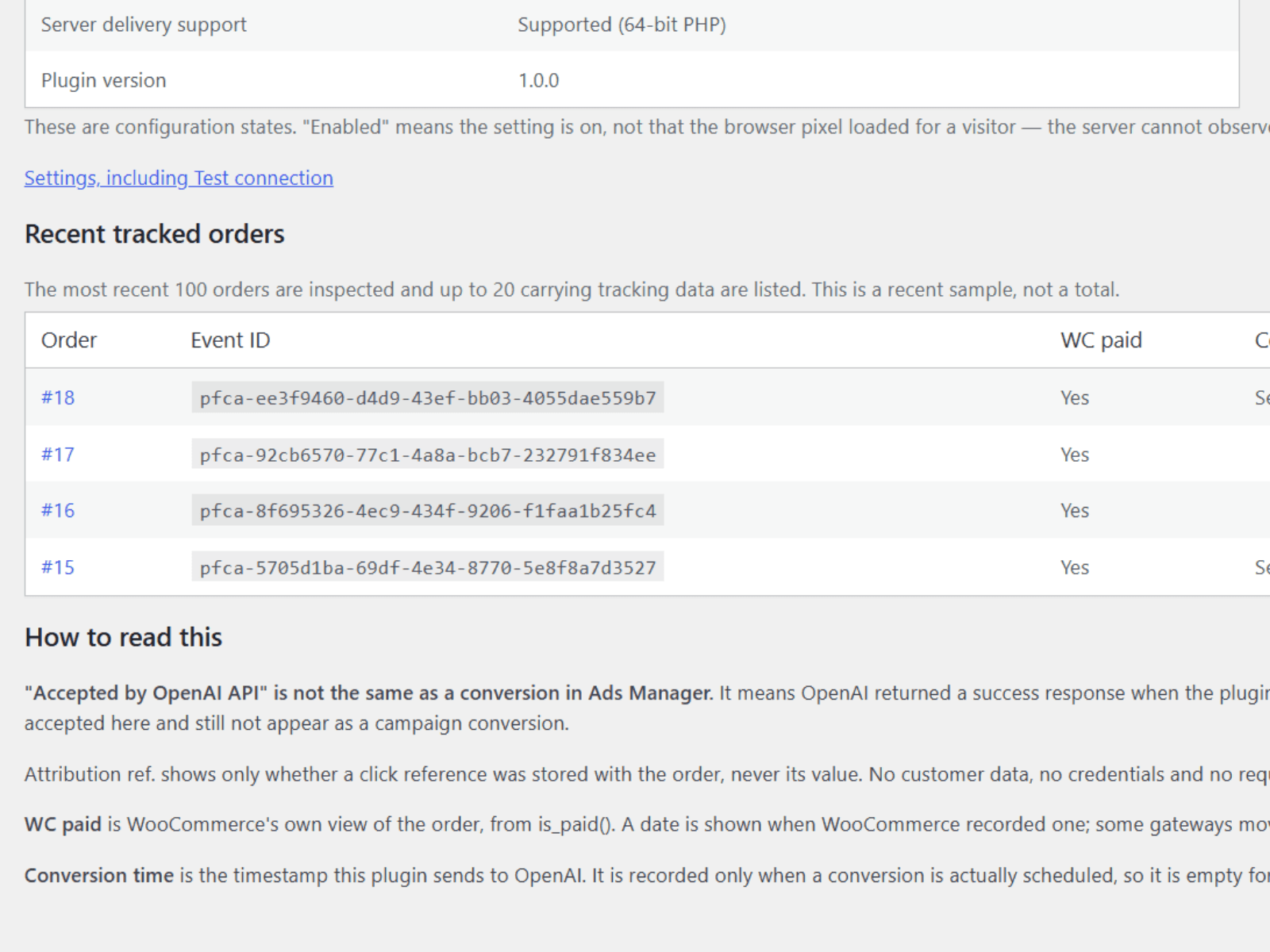
Instead of guessing whether the integration fired, open the order in WooCommerce and read what happened to it.
- Accepted
- OpenAI accepted the purchase.
- Pending
- Queued or waiting for another delivery attempt.
- Not sent
- The purchase was not sent. Open the order to see why.
- Failed
- The latest delivery attempt did not complete.
- Delivery state
- Attempts made
- Response status
- Manual retry when the order is eligible
Live in four steps.
Have your OpenAI Pixel ID and Conversions API key to hand, and that is the whole job.
Install the plugin
Upload the zip in WordPress and activate it, the same as any other plugin.
Activate your licence
Paste the licence key from your purchase email. The settings screen confirms the activation.
Add your OpenAI details
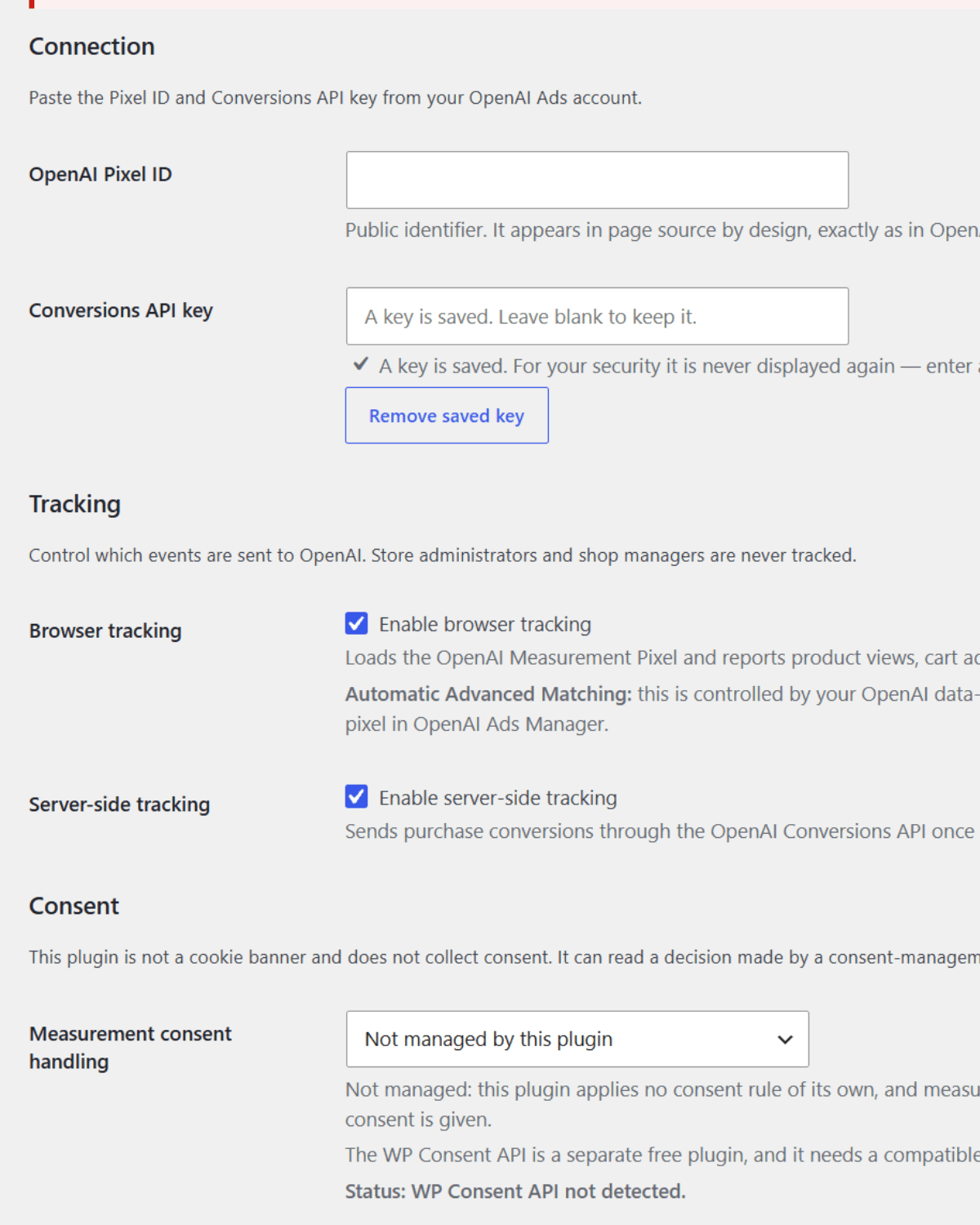
Enter your Pixel ID and your Conversions API key. That is the whole configuration.
Start tracking
Your store begins reporting product views, carts, checkouts and purchases to ChatGPT Ads.
Then check your next order
Open a paid order in WooCommerce and see whether its purchase was accepted.
For whoever asks the technical questions.
Every event, and where it is sent fromRead the documentation
- WooCommerce native
- Products, cart and orders read directly, with no data layer to maintain.
- HPOS compatible
- High-Performance Order Storage and the legacy order tables are both supported.
- Browser and server deduplication
- One shared event ID per order, taken from the order itself; OpenAI resolves the two deliveries into one conversion.
- Automatic retries
- Timeouts, rate limits and temporary server errors are retried on their own.
- Consent aware
- Follows the WordPress Consent API, and stays closed when consent is missing.
- Native WordPress updates
- Updates arrive on the normal plugins screen while the licence is active.
Your compliance obligations depend on your store, configuration and jurisdiction. Consent tools that do not implement the WordPress Consent API are not detected automatically.
One licence, one year.
Every plan has the same tracking, the same diagnostics and the same updates. The only difference is how many sites you can activate.
Starter
€79/year
1 site
For one WooCommerce store.
Growth
Recommended€199/year
Up to 5 sites
For growing teams and multiple stores.
Agency
€399/year
Up to 25 sites
For agencies managing client stores.
Every plan includes the same tracking features. Choose based on how many sites you manage.
Questions.
What is Pixel for ChatGPT Ads?
It is a WooCommerce plugin that implements conversion tracking for ChatGPT Ads. It loads the OpenAI Measurement Pixel in the browser and sends purchase events server-side through the OpenAI Conversions API, using data from your WooCommerce orders.
Do I need a developer to set it up?
No. Installation is a normal WordPress plugin upload and activation. Configuration is one settings screen where you enter your OpenAI Pixel ID, your Conversions API key and your licence key.
There are no theme edits, no checkout template changes and no tag manager container to maintain. A developer is only useful if your store has heavy checkout customisation or a caching layer that needs adjusting.
Which events are tracked?
Product viewed (contents_viewed), added to cart (items_added) and checkout started (checkout_started) are sent from the browser. Purchase (order_created) is sent from the browser and server-side through the Conversions API.
Does it support server-side tracking?
Yes, for purchases. When a WooCommerce order reaches a paid status, order_created is sent from your server to the OpenAI Conversions API.
Product views, add to cart and checkout start are browser events only. The site does not claim server-side coverage for events that are not sent server-side.
What happens when my licence expires?
New conversion tracking stops. The plugin stays installed and your settings are kept, but no new events are sent, and plugin updates and support end. Renewing restores all three.
Is this an official OpenAI plugin?
No. Pixel for ChatGPT Ads is an independent product and is not affiliated with or endorsed by OpenAI. It integrates with OpenAI's advertising measurement interfaces; it is not built, reviewed or certified by OpenAI.
Install it, connect it, and check your next order.
Pixel for ChatGPT Ads is an independent product and is not affiliated with or endorsed by OpenAI.